Decoration Pack (Beta) Texture Pack Minecraft PE

Decoration Pack works only with Minecraft PE beta, but it allows changing the design of four blocks and all of them are interior items, so you may customize your house!


After installing of Decoration Pack, you will notice that some items was replaced by modern furniture and it is great if you want to change something inside your house. Moreover, it suits Minecraft PE creations too!


Since head and skull are wearable items, you may use put them on your head. Considering that laptop replaced the zombie head and that fridge replaced skull, it causes pretty fun situations, when you travel the Minecraft PE world and you have fringe instead of you face. But remember that this mod is compatible with 1.2.6 beta version of MCPE. We hope that it will work with later versions too.

Installation:
  • Important: This resource pack requires the latest beta (1.2.6).
  • Download Resources .McPack
  • Open Minecraft
  • Settings > Global Resources > Activate the pack
Modern Tools Add-on Minecraft PE

We found the perfect way to turn your house in Minecraft PE into modern one. PC, fridge and even furniture – the same as in real life!


All the default tools in the MCPE are great for the survival mode, but in some maps or creations they may look too old-fashioned. Modern Tools Add-on, that requires version 1.0.4.1 to be installed on your device, bring into game 6 new tools. To spawn each of them you have to combine a forge with some other elements (you will see the full list of combinations after installation).


Let’s take a closer look!

• PC gives you direct access to MineBay, so you can sell and buy other items.
• Fridge is inventory with 27 slots.
• Kitchen Stove has to cook raw meat in one blink.
• Table and chairs is just a furniture, that will make you house a bit cozier.
• Combination of forge and coal will bring you random item like gold or diamond.


Installation:
This add-on requires the beta version (1.0.4.1) of Minecraft Pocket Edition.
  • Download Resources .McPack
  • Download Behaviors .McPack
  • Activate the packs for a world in-game

PocketDecoration Mod (Android) Minecraft PE

Here comes the time for the modern interior in Minecraft PE world! All the furniture and other items, such as paintings or colored stained glass is now available!


Everyone will agree that there is a lack of modern interior items in default version of Minecraft PE. That is why we want to introduce you PocketDecoration Mod. Note: this is only beta-version (but you would have to update it manually) and you need the BlockLauncher to be installed on your device. PockedDecoration mod is supported by Android devices only.


Basically, the mod brings a lot of new staff into Minecraft PE world. Most of items are just for decoration, but some of them have use. For example, there is fully functional TV. We highly recommend you to check out the creative inventory to get the recipes of these items for survival mode.


Item/Block IDs & Crafting Recipes
  • Bin (607) (use: remove block from inventory) – 7 iron ingots
  • Oak Cupboard (614) – 8 oak wood planks + 1 glass block
  • Spruce Cupboard (615) – 8 spruce wood planks + 1 glass block
  • Acacia Cupboard (616) – 8 acacia wood planks + 1 glass block
  • Cabinet (608) – 8 wooden blocks + 1 chest
  • Spruce Cabinet (609) – 8 spruce wood planks + 1 chest
  • Acacia Cabinet (610) – 8 acacia wood planks + 1 chest
  • Chopping Board (612) – 6 wood planks
  • Fridge (619) (use: turns cooked food into raw food) – 7 iron blocks + 1 chest + 1 ice block
  • Kitchen Cabinet (619) – 8 lime stained clay + 1 chest
  • Kitchen Counter (620) – 3 lime stained clay + 6 quartz blocks
  • Microwave (622) (use: bakes potatoes) – 6 quartz blocks + 2 glass panes + 1 stone block
  • Oven (623) (use: use raw food to get cooked food items) – 8 iron blocks + 1 furnace
  • Oven Top (624) – 4 iron ingots + 1 glowstone
  • Stereo (626) (use: produces sound) – 1 iron ingot + 6 acacia wood blocks
  • Stone Path (627) – 3 diorite blocks
  • Stone Table (628) – 5 stone blocks
  • Television (630) – 7 stone blocks + 1 glass pane + 1 redstone dust
  • Wooden Table (631) – 5 oak wood planks
  • Present (625) (use: destroy present to open and get a random gift) – 1 paper + 6 red wool
  • Ceiling Light (611) (use: produces light) – 4 glowstones + 1 quartz block
  • Doorbell (618) (use: produces sound) – 2 oak wood + 1 quartz block
  • Spruce Wood Cabinet (606) – 8 oak wood planks + 1 chest
  • Acacia Wood Cabinet (607) – 8 acacia wood planks + 1 chest
  • Curtains (614) – 5 orange wool + 2 gold ingots
  • Tablet (629) (use: used with the coins to buy iron ingots) – 7 stone blocks + 1 glass pane + 1 gold ingot
  • Coin (613) (use: money used for purchasing iron ingots with the tablet) – 1 gold ingot
  • Oak Wood Drawer (601) – 7 oak wood planks + 2 chests
  • Spruce Wood Drawer (602) – 7 spruce wood planks + 2 chests
  • Acacia Wood Drawer (603) – 7 spruce wood planks + 2 chests
  • Birch Wood Drawer (604) – 7 spruce wood planks + 2 chests
  • Dark Oak Wood Drawer (605) – 7 dark oak wood planks + 2 chests
  • Jungle Wood Drawer (606) – 7 dark oak wood planks + 2 chests
  • Wooden Timber (632) – 6 wood planks
Stained Glass Block IDs
  • White Stained Glass (223) – 8 glass blocks + 1 bone meal
  • Orange Stained Glass (224) – 8 glass blocks + 1 orange dye
  • Magenta Stained Glass (225) – 8 glass blocks + 1 magenta dye
  • Light Blue Stained Glass (226) – 8 glass blocks + 1 light blue dye
  • Yellow Stained Glass (227) – 8 glass blocks + 1 dandelion yellow
  • Lime Stained Glass (228) – 8 glass blocks + 1 lime dye
  • Pink Stained Glass (229) – 8 glass blocks + 1 pink dye
  • Gray Stained Glass (230) – 8 glass blocks + 1 gray dye
  • Light Gray Stained Glass (231) – 8 glass blocks + 1 light gray dye
  • Cyan Stained Class (232) – 8 glass blocks + 1 cyan dye
  • Purple Stained Glass (233) – 8 glass blocks + 1 purple dye
  • Blue Stained Glass (234) – 8 glass blocks + 1 lapis lazuli
  • Brown Stained Glass (235) – 8 glass blocks + 1 cocoa beans
  • Green Stained Glass (236) – 8 glass blocks + 1 cactus green
  • Red Stained Glass (237) – 8 glass blocks + 1 rose red
  • Black Stained Glass (238) – 8 glass blocks + 1 ink sack
Changelog
  • Added support for 1.1
  • Added clay bricks and blender
  • Removed doorbell, fridge, curtains, oven rangehood, timbers and the television
  • New design for most blocks


Install Guide:
Important: This mod requires the latest beta for BlockLauncher. You can also sign up for the beta here: Free, Pro
  • Press the download button further down on this page to download a .modpkg file.
  • Use Toolbox or BlockLauncher to import the mod (.modpkg) (works similar as to .js scripts).
  • Restart Toolbox / BlockLauncher, enter a world and enjoy the new features!
MrCrayfish’s Furniture Mod 1.15.2/1.14.4 adds in a huge amount of furniture into Minecraft. It includes various items like, couches, chairs, TVs, ovens, computers, and much more. The cool thing about this mod is that most of the blocks have very useful features to them and are not just for decoration.

List of Furnitures:
  • Bedside Cabinet
  • Wooden Table
  • Wooden Chair
  • Cabinet
  • Wooden Coffee Table
  • Fridge
  • Freezer
  • Couches (White, Green, Brown, Red and Black)
  • Blinds
  • Curtains
  • Carpet (White, Green, Brown, Red and Black)
  • Lamp
  • Stone Chair
  • Stone Table
  • Stone Coffee Table
  • Oven
  • Oven Range Hood
  • Hedge (Oak, Pine, Birch and Jungle)
  • Bird Bath
  • Stone Path
  • Picket Fence
  • Water Tap
  • Mail Box
  • TV
  • Computer
  • Printer (Includes Ink Cartridge)
  • Fire Alarm
  • Stereo
  • Electric Fence
  • Ceiling Light
  • Christmas Tree
  • Presents
  • Toilet
  • Shower
  • Shower Head
  • Basin
  • Bin
  • Bath
  • Wall Cabinet
  • Shower Head
  • And much more

Screenshots:


Requires:
  • Minecraft Forge
  • Rift Mod Loader (Only for Minecraft 1.13)
How to install:
  • Make sure you have already installed Minecraft Forge.
  • Locate the minecraft application folder.
  •         On windows open Run from the start menu, type %appdata% and click Run.
  •         On mac open finder, hold down ALT and click Go then Library in the top menu bar. Open the folder Application Support and look for Minecraft.
  • Place the mod you have just downloaded (.jar file) into the Mods folder.
  • When you launch Minecraft and click the mods button you should now see the mod is installed.


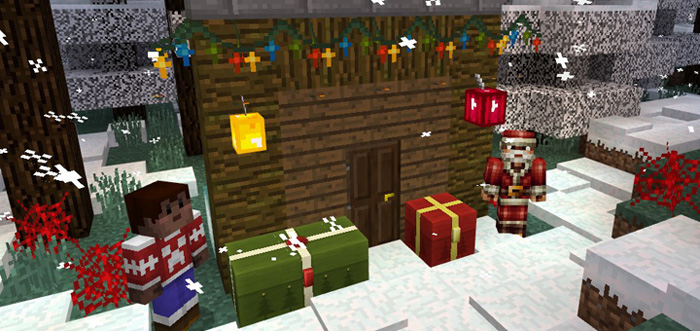
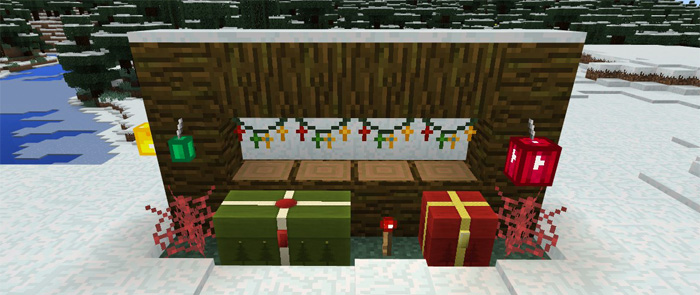
This texture pack was created to help you get in the Christmas spirit. There are are six blocks which can be used as Christmas decorations and two of the mobs wear a Santa hat. It’s a rather simple texture pack but at the same time very useful as it makes Minecraft feel more winter-like and Christmassy.

How does it work?

Some of the blocks in-game have been redesigned to look like Christmas decorations. It’s only a few days to Christmas as of writing this and it’s time to get in the Christmas spirit.

christmas-decorations-2

Here’s a full list of the blocks and mobs which have been edited.

  • Cobweb = Animated colors
  • Cocoa Beans = Colored lamps
  • Single Chest = Christmas gift
  • Double Chest = Big Christmas gift
  • Iron Bars = Christmas lights
  • Redstone Torch = Animated colors
  • Villagers and zombies wear Christmas hats

christmas-decorations-5christmas-decorations-3

Installation

  • Download Resource .McPack
  • Activate the pack for a world in-game
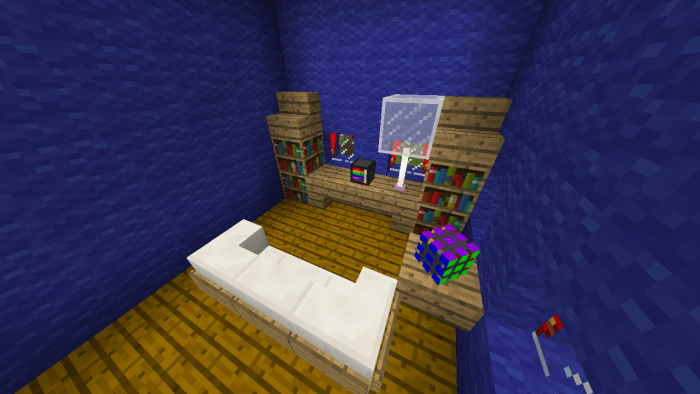
MEET! Texture pack “FANCY DECOTATIONS” It changes the boring and unnessary Minecraft PE textures to cool dECORATIONS for your home.

What is in it?:
Rubik’s cube – head
TV – wither skeleton skull
  • Clock – Skeleton of a Skull
  • Aquarium – reptile skull
  • French Fries – Zombie Head
  • Reading Table – Enchantment Table
  • Colored boards – some glazed terracotta blocks
  • Fake Lucky Block – Dynamite (TNT)
  • Oven Top – Yellow Carpet
  • Glass with curtains – blue glass


Download now!

Attention! For the first time, minecraft may turn off, but for the second time, this certainly will not happen.

DESCRIPTION OF VERSION 3 :

  • Shalker – TV (animated)
  • blue shalkerbox – TV stand with shelves
  • aqua shalkerbox – washbasin
  • gray shalkerbox – TV stand
  • blue shalkerbox – bottom of the refrigerator
  • lime shalkerbox – top of the fridge
  • Magenta Shalkerbox – toilet
  • orange shalkerbox – shower
  • pink shalkerbox – bottom of the shower stall
  • purple shalkerbox – top of the mailbox
  • silver shalkerbox – footboard for mailbox
  • unpainted shalkerbox – kitchen cabinet
  • white shalkerbox – kitchen cabinet with drawers
  • yellow shalkerbox – microwave
  • some paintings – frames (with things)
  • (some things from previous versions)

SCREENSHOTS AND GIF (PICTURES) VERSIONS 3 ðŸ˜‰ 

Changelog
references to the greatest mrcrayfish mod creator added. the TV - (skull of the skeleton of the withers) was replaced by the texture of a stereo speaker.

Installation
Download textures in mcpack format . In the world settings, in the "texture packs" section, select the downloaded texture and click on "+". Play and enjoy!

Installing version 3 : Download the resource and behavior packs. In the world settings: section resource (behavior) packs: find the downloaded texture (behavior) packs and click on "+" to activate. PLAY AND ENJOY!